
Language Reference
Learn more about the bridge language.
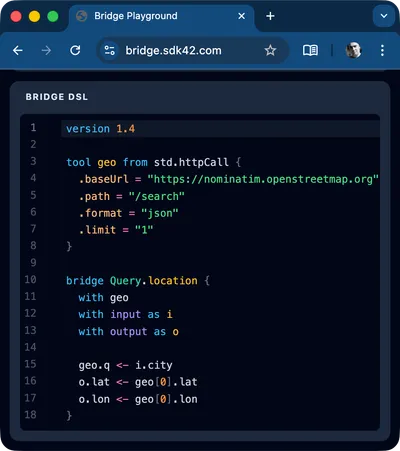
The Bridge replaces imperative orchestration code with static .bridge files. Instead of writing complex async/await logic, manual Promise.all wrappers, and custom data mappers, you simply define what data you need and where it comes from.
The Bridge engine parses your wiring diagram, builds a dependency graph, and executes it - automatically handling parallelization, fallbacks, and data reshaping.
You write the topology; the engine handles the execution.
version 1.5
# 1. Define your tools (APIs, DB queries, or custom TS functions)tool geo from httpCall { .baseUrl = "https://api.map.com" }tool weather from httpCall { .baseUrl = "https://api.weather.com" }
bridge Query.should_i_go_outside {  with geo  with weather  with input as i  with output as o
  # 2. Wire inputs to tools  geo.city <- i.cityName
  # 3. Chain tools together (Engine auto-resolves dependencies)  weather.lat <- geo.lat  weather.lon <- geo.lon
  # 4. Map the final output  o.why.temperature <- weather.current.tempC ?? 0.0
  # 5. Final decision (business rules)  o.decision <- weather.current.tempC > 25}
# should_i_go_outside({cityName: "San Francisco"}) => { decision: true, why: { temperature: 28 }}Promise.all or batching logic required..bridge files are just text parsed into an execution graph, you don’t need to recompile, rebuild, or redeploy your entire Node application to change a data mapping or swap an API provider. You can update and hot-reload your rules on the fly.Because The Bridge strictly controls how data flows from inputs to tools to outputs, it is the perfect engine for architectures that require strict boundaries and clean mappings.
.bridge files..bridge file without ever touching the calling service’s code.Language Reference
Learn more about the bridge language.
Playground
Learn by example in our web based interactive playground.
Standard Library
Browse all built-in tools — HTTP client, string & array helpers, audit logging, and more.
2 Runtimes
You can run your bridge files
standalone or as a resolver for
your graphql server
VS Code extension
To get syntax highlighting and IntelliSense install the VS Code extension.
Runnable Examples
For some real world integration examples head over to github